








Does anyone remember the Power Model of certified Contact Centers? For the longest time it was known as the Power connectivity method, but Microsoft never did anything with this program other than a “coming soon” notification on the Microsoft Learn page. It now seems this Power integration method has been renamed to UNIFY!
Unify
Let’s jump into what Unify actually is. This will allow ISV’s to develop their CCaaS applications using the Teams calling infrastructure directly. The Unify model will also rely on the Teams Phone Extensibility technology announced by Microsoft during Enterprise Connect 2025. Unify will also support advanced features that are currently available when using Azure Communication Services:
- ACS Call Automation
- ACS Calling SDK
- Open AI
- Other Microsoft Tools
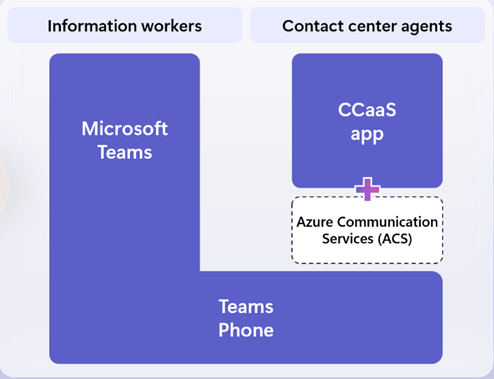
Unify is the new kid of the block, but there are already well-established integration methods that ISV’s have been using to deliver CCaaS applications to Teams users.
Extend
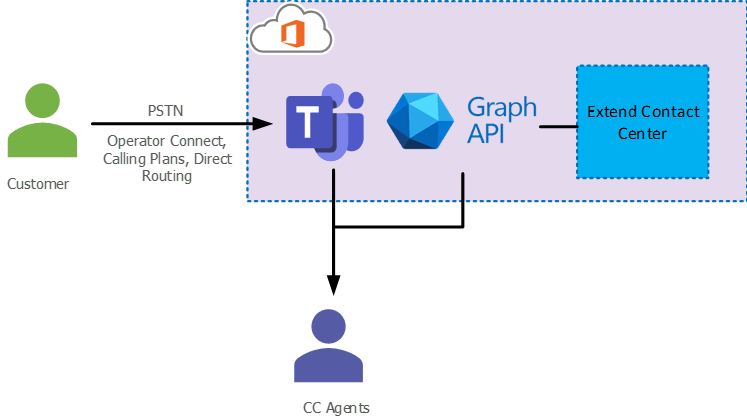
The one I like deploying with my customers is the Extend model. Extend integration model integrates with the Teams client using Teams Graph API’s and Cloud Communication API. One reason I love the Extend model is the ease of deployment from the PSTN side is second to none. Anyway you can deliver calls into Microsoft Teams you can deliver it to an Extend contact center. Operator Connect, Direct Routing, and Calling Plans. It doesn’t matter as long as you get it into Teams in some fashion.
Features include:
- Teams-based app for agents
- Teams Client calling for all calling controls
- Chat and collaboration experience integrated with Teams clients
- Preserve performance and quality of Teams client experience in all apps
Connect
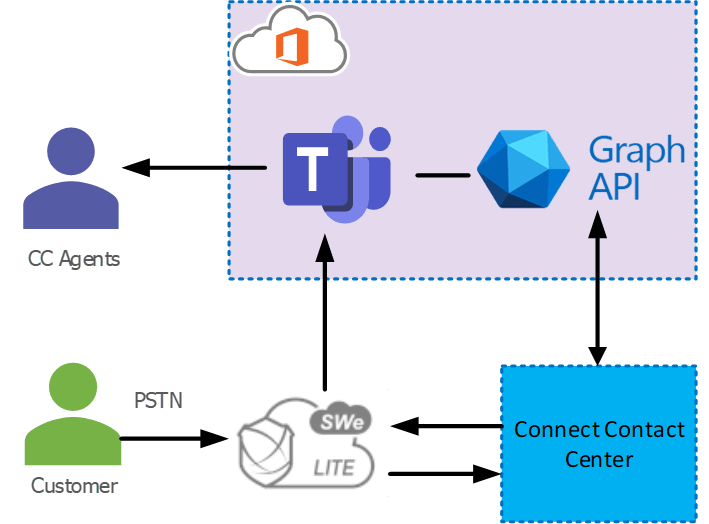
Lastly and firstly (as it came out first) is the Connect method. This model specifically uses Microsoft certified Session Border Controllers with Direct Routing to connect the ISV’s contact center solution into Microsoft Teams Phone. Some people really like the Connect method as you are not bound by the Graph API’s and can control more of the call, however it means that calls with trombone through the contact center before getting into Teams.
However, you’re looking to integrate into Microsoft Teams for your Contact Center make sure you reach out to a certified ISV based on the integration method you are interested in and have a chat with them about what they can offer to best suit your requirements. You can find a list of them here.
Are you interested in the new Unify method? Will it tempt you from moving away from another integration method?
To comment view the article on LinkedIn.
Zach Bennett is Microsoft Teams MVP and Principal Architect at LoopUp.