







A handy update for Teams Phone admins managing shared devices aka Common Area Devices.
You can now remotely manage frequently used contacts for Common Area Phones. These contacts appear in the Company contacts group on Teams Phone devices, making it easier for users to reach the right people quickly.
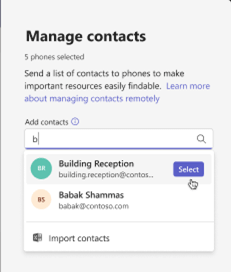
Whether you’re adding or removing contacts, the process is simple and intuitive. This helps ensure shared devices stay up to date with the most relevant contact information, without needing to physically access the phone.
This is great for contacts that you would like to always be accessible on shared devices but don’t want users to remember extensions or numbers. Such as, security desks, receptions, and kitchen areas. Also having the ability to bulk add these to devices means administrators are spending much less time managing these devices and contacts.
For more info on configuration, check out the official Microsoft documentation.
Zach Bennett is Microsoft Teams MVP and Principal Architect at LoopUp.
To comment view the article on LinkedIn.