









Call transfers from Teams Phone devices are now faster and more accurate thanks to suggested contacts. During an active call, users will see a list of intelligently surfaced contacts based on context, communication patterns and contact groups.
This means fewer clicks, less searching and quicker transfers to the right person.
What’s New?
When transferring a call, Teams Phone will now suggest contacts who are most relevant to the conversation. These suggestions appear directly on the transfer screen, making it easier to complete the transfer without needing to scroll through your entire contact list.
This feature is available on Teams Phone devices and requires users to be licensed for Teams Phone.
Here’s a quick look at what it looks like on the device:
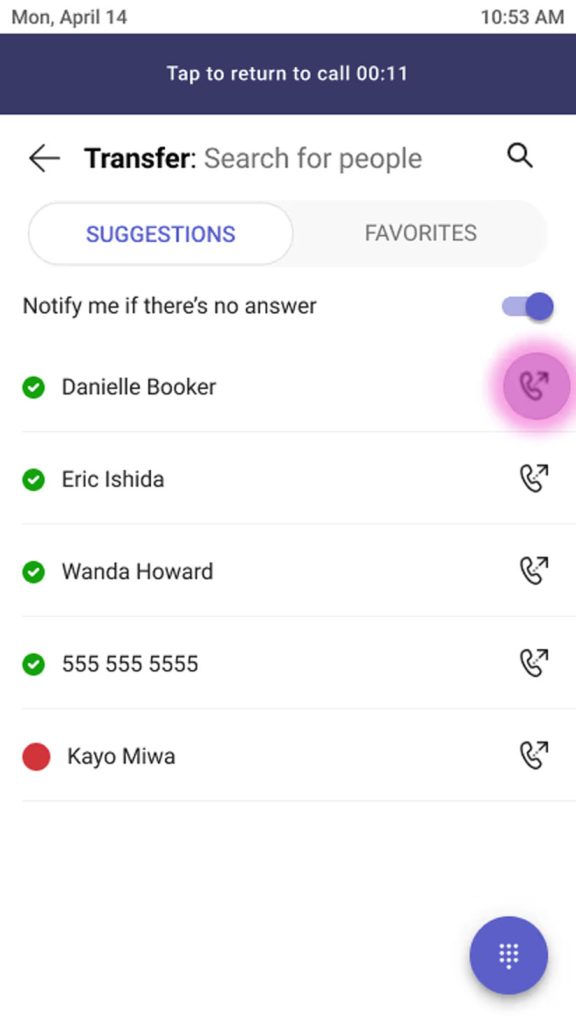
This is a great quality-of-life improvement for anyone regularly transferring calls, especially in busy environments like reception desks, service centres or team leads managing multiple conversations. It’ll reduce the number of clicks you’ll need to do to transfer that call to the correct person. Something I know some customers of mine have raised issues with, in the past.
For more info, check out the official Microsoft documentation.