








July brought another update to Microsoft Teams Phone, and this is the ability to use Copilot during calls without enabling transcription or recording. This is a big win for organisations that want to benefit from AI-powered assistance while keeping sensitive conversations off the record.
What’s New?
Previously, using Copilot during a Teams call meant turning on transcription or recording. Now, once your admin enables this option, you can simply click the Copilot button in the header menu during a call and start using Copilot with no transcription, no recording.
This means you can still have Copilot capture:
- Key discussion points
- Task owners
- Next steps
All without leaving a persistent record of the conversation. Perfect for sensitive discussions where privacy is key.
What Do You Need?
To use this feature, you’ll need:
- Microsoft Teams
- Microsoft 365 Copilot license
- Teams Phone license
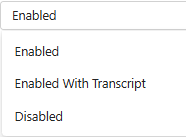
Admins will need to enable this capability in the Teams Admin Center under the users Calling Policy.
Once it’s switched on, users can start using Copilot in calls without any additional setup.
Why It Matters
This update is especially useful for industries like legal, healthcare, or finance where recording conversations isn’t always appropriate. It also gives users more flexibility in how they use Copilot.
For more details, check out the official Microsoft documentation.
Zach Bennett is Microsoft Teams MVP and Principal Architect at LoopUp.
To comment view the article on LinkedIn.