








Contents
Overview
A growing number of businesses are using Microsoft Teams as an enterprise telephony replacement.
Smaller businesses may choose Microsoft Calling Plans as an off-the-shelf solution for PSTN connectivity, but almost all larger organisations use Direct Routing to connect to a telecommunications service provider or carrier.
These organisations may outsource all elements of enterprise telephony to a partner who will take care of solution design, deployment, service delivery and support. Or they may manage Microsoft Teams Calling in-house, and just use a carrier or service provider for PSTN connectivity.
This whitepaper considers what’s involved with each option, and discusses their relative merits, taking into account key issues of cost, control and complexity.
Introduction
Microsoft Teams has rapidly become the go-to tool for organisations to increase collaboration and productivity, enabling them to connect to colleagues, wherever they are. Now, more and more businesses are realising that they need to close the connectivity loop by incorporating telephony into Teams (known as Teams Calling). How best, then, to do that?
Most businesses will require a solution called “Direct Routing” to connect their calls. We explain what this is in this guide. IT decision-makers will need to consider whether to outsource the management of Direct Routing to a specialist service provider or manage it themselves.
This is important, since many IT leaders see it as their mission to introduce technologies that help their organisations win, not just function.
Therefore, they will want to choose an option that allows IT resources to be focussed on value-adding projects, rather than being tasked with maintaining and supporting telecoms systems.
This time saving function can provide significant strategic benefit: not just for the IT department, but the wider organisation.
We outline the different options and discuss the principal benefits and drawbacks, so that informed decisions can be made around how best to implement Teams Calling for the benefit of your business.
Why use Microsoft Teams Calling?
By introducing telephony into Teams, Teams becomes a comprehensive, unified communications solution, through which all voice, email, chat and audio/video conferencing needs are met.
With Teams Calling, users can make and receive phone calls to and from both their internal and external contacts. Doing so creates one single, seamless interface for all their communications needs, on any device. Having everything in one place is user-friendly for your staff, enabling them to be more efficient and effective.
Productivity tools like Teams have been at the forefront of the hybrid working revolution: and Teams Calling is a vital component. Especially since one study found that the number of telephone calls increased by 230% as workers moved to remote working during Covid-19.
What is Direct Routing?
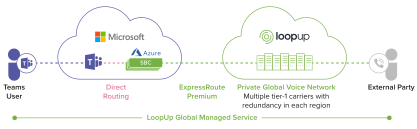
Direct Routing is the means by which phone numbers are connected into the Teams call. There are many ways it can be architected, but essentially, it refers to the technology that connects the public switched telephone network (PSTN) to Microsoft’s virtual Teams phone system. It does this through a gateway called a Session Border Controller (SBC). The SBC gives you a lot of flexibility around how you connect to Teams, either via a carrier or through your existing on-site private branch exchange (PBX).
How best to implement Direct Routing for Microsoft Teams Calling?
The impact on staff productivity in general terms is not the only factor to bear in mind when deploying Teams Calling. Businesses will also want to ensure that Teams Calling is set up and managed in a way that allows their IT teams to operate as effectively and efficiently as possible too. That way, they can spend less time on maintaining it and more time on other business enhancing or value-adding activities.
You can choose to:
Manage Direct Routing yourself, hosting critical connectivity, namely SBC gateways and PBX connections either: a) in-house, on your business premises, using physical equipment; or b) virtually, in the cloud.
Or:
Outsource the management of Direct Routing to a service provider (what we call Direct Routing as a Service or DRaaS)
How Direct Routing works
“Choosing whether to manage Direct Routing yourself or not is a bit like building a kit car versus just buying a car,” says Ben Lee, Microsoft Technology Lead at LoopUp. “With a kit car, you can pick all the components yourself, but then you need to know how to put them together in the right way to make it work. Most times, it would simply be easier buy a car that’s ready-made to the specifications you want.”
1. Self-managed Direct Routing – what’s involved?
“Direct Routing is a sophisticated and complex solution that requires specialist expertise to implement properly,” adds Lee. “Therefore, it’s important to understand what is involved in each different approach before you start, so that the appropriate investment in internal or external resources can be made.”
With self-managed Direct Routing, overall responsibility for the connectivity to and from Microsoft’s virtual Teams phone system rests with you. That’s true whether you are using a cloud-hosted solution to eliminate the need for large amounts of hardware on your premises, or hosting everything on-site.
This means that your IT team’s remit will include system architecture, set-up, maintenance, support and trouble-shooting. It will include maintaining the internet connection and linking into the appropriate PSTN connection.
Whichever option you choose, you will likely need to work with several different third parties to deliver your service. These include any cloud-hosting provider, plus PSTN carriers in different locations, as well as Microsoft and your ISP.
A) Self-managed – hosted on-premises
With this option, you host and manage in-house all the necessary hardware required for Teams Calling.
Your key responsibilities include:
- System design and configuration – It’s up to you to develop and support a resilient solution that delivers optimal connectivity for your business.
- Infrastructure maintenance and oversight – Hardware including SBC gateways and PBX equipment needs to be installed, serviced and maintained on site. This requires significant amounts of physical space to house, and internal skills to get right. Other issues to consider include: how much upfront capex is needed, the power and air conditioning costs incurred to run and cool hardware, making sure specialist hardware and spares are available, keeping abreast of licensing requirements and software updates, and how to manage downtime when systems require patching and during other maintenance activities.
Negotiating with telecoms carriers – As well as managing your own systems and hardware, you will also need to engage with telecoms carriers to secure connections into local PSTN networks for all the locations that you require. This comes with its own costs and challenges.
For example, it may be necessary to pay carriers for more calling capacity than you typically need, in order to cover peaks in usage. Or you may choose to invest in dedicated circuits to centralise your capacity, and/or upgrade from ISDN lines to SIP trunks to deliver optimum connectivity. You may need to negotiate with many disparate carriers globally. Moreover, some countries also impose very specific rules and restrictions around call connectivity and emergency services provisioning for internal teams to be aware of.
B) Self-managed – hosted in the cloud
With this option, there is no need to install and maintain physical PBX equipment or SBC gateways because these are hosted virtually in the cloud. However, maintaining access to the cloud can be very complicated in its own right, as there are more third-parties to co-ordinate. In most other respects, the issues and requirements are the same as with on-premises self-managed solutions.
“People often think that a cloud-hosted solution is easier than hosting everything on-premises,” Lee explains. “But although cloud-hosting has the advantage of being space-saving, it’s actually probably more complicated to design and manage because you still have to oversee the cloud access, along with everything else.”
Your key responsibilities include:
- System design and configuration – It’s up to you to develop and support a resilient solution that delivers optimal connectivity for your business.
- Infrastructure maintenance and oversight – You will need to deploy and support the bulk of your Teams Calling infrastructure (other than the physical PBX and SBC elements) yourself. This includes designing suitably resilient access to your cloud-hosting provider, which in itself requires deep technical expertise.
- Negotiating with telecoms carriers – You will need to negotiate for PSTN connectivity with carriers around the world – and to be aware of jurisdictions where there are specific and complex rules governing access to PSTN networks. You will need to ensure you have enough capacity to cover peaks in usage (which may mean paying for more capacity than you need most of the time). With this option, you will definitely need to invest in SIP trunks (ISDN lines cannot be used for cloud connectivity) and consider dedicated circuits for optimum performance.
2. Service provider-managed Direct Routing as a Service (DRaaS) – what’s involved?
With this option, you hand over responsibility for service delivery to an outsourced service provider to design and implement to your specific needs. Not all outsourced providers offer an end-to-end managed service, so shop around to compare service levels. With an end-to-end managed service provider option (the gold standard that we call Direct Routing as a Service), the service provider will cover all bases on your behalf and create a bespoke solution for your needs, encompassing:
- System design and configuration – They should have specialist expertise to deliver tailored system design and configuration, implement migration/deployment, and oversee on-going management and quality control to ensure best-in-class connectivity 24/7. DRaaS service providers like LoopUp can also support with associated issues such as general corporate network optimisation
- Infrastructure maintenance and oversight – They should assume full responsibility for end-to-end service, including updates, licenses, maintenance and service availability. Additionally, DRaaS providers should provide tools to give vital intelligence into your Teams Calling service. For example, portals which deliver data analysis, with dashboards that display insight clearly, and enable adjustments (e.g. to user numbers) to be made easily.
- Negotiating with telecoms carriers – They should have strong relationships with local PSTN carriers worldwide. This means they can deliver anywhere, anytime connectivity with no constraints on capacity, leveraging economies of scale across their entire customer base to keep services competitive. They should also be aware of, and able to work within, any specific jurisdictional legal requirements.
Ben Lee advises, “If you are self-managing Direct Routing, however you choose to host it, you need deep technical expertise to deploy it in the first place or fix it if it goes wrong. By outsourcing responsibility for everything to specialists, including dealing with carriers, updating software and licences, managing capacity globally and trouble-shooting, you can achieve a topquality service cost-effectively, and free up your IT team to concentrate on other things.”
If you are self-managing Direct Routing, you need deep technical expertise to deploy it or fix it if it goes wrong. By outsourcing responsibility to specialists, including dealing with carriers, updating software, managing capacity globally and troubleshooting, you can achieve a top quality service cost-effectively, and free up your IT team.
Which option is right for your organisation? Use this checklist to decide.

If you answered yes to two or more of the above questions, speak to a managed service provider to find out more.
Summary
At issue here is the relative cost, level of control and complexity of managing Direct Routing yourself or using an end-to-end managed service provider to do it for you. Organisations will need a resilient, reliable service that suits specific needs, is cost-effective to run, and is easy to manage.
Given that there are so many moving parts to co-ordinate, for many businesses the easiest and most suitable option is to outsource design, maintenance and support to a dedicated third-party provider. That way, you avoid the need to have expensive equipment and expertise inhouse, devolving responsibility to specialists in their field, while still having oversight of, and input into, how your systems are designed and operate.
This is a value-add for IT teams who would otherwise have to implement and maintain everything themselves.
It’s often the case that huge amounts of IT resources are already being expended on attending to legacy systems. Having to support PBX systems and carrier relationships only adds to that burden, leaving less capacity for other important, innovative projects that will deliver strategic advantage.
By implementing Teams to co-ordinate email, document sharing, collaboration and communication, organisations have already bought into the model of handing over all these services to a third party to manage. Your primary IT suite is effectively outsourced to Microsoft.
“The question IT decision-makers need to ask when adding Teams telephony into the mix is: what advantage is there in managing the technical components of Teams Calling ourselves, versus outsourcing this as well?” says Lee. Unless there’s a compelling reason to take the DIY route, it may be best left to the experts.”
The question IT decision-makers need to ask when adding Teams telephony into the mix is: what advantage is there in managing the technical components of Teams Calling ourselves, versus outsourcing this as well? Unless there’s a compelling reason to take the DIY route, it may be best left to the experts.