









A new feature has hit Microsoft Teams Phone! It’s the ability to set call priorities within your call queues. If you’re managing multiple queues or juggling different types of incoming calls, this is a feature you’ll want to pay attention to.
What are Call Priorities?
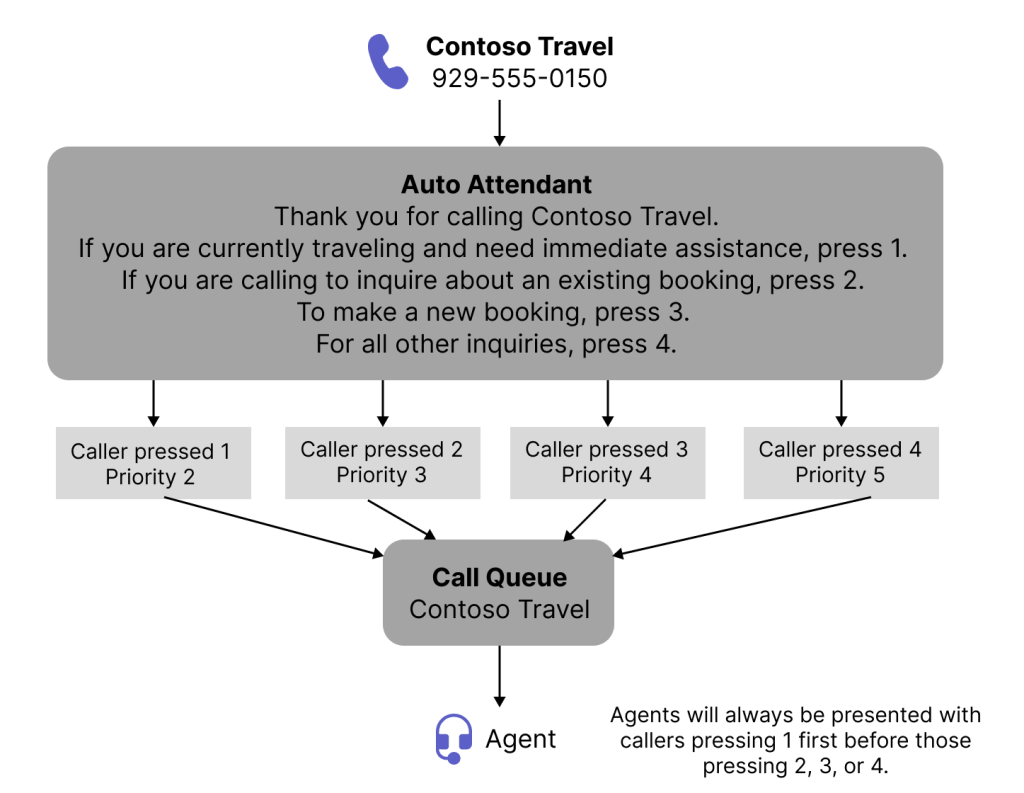
Call priorities allow you to define the order in which calls are routed to agents. This means you can ensure that high-priority calls (like VIP customers or urgent support issues) are answered first, while lower-priority calls wait in the queue until an agent becomes available. You can assign a priority value between 1 and 5, where 1 is the highest priority, 5 is lowest and 3 is default.
This is especially useful in environments where multiple queues feed into the same group of agents. By assigning a priority level to each queue, Teams will route calls based on that hierarchy rather than just first-come, first-served.
Why Does This Matter?
Let’s say you’ve got a support queue and a general enquiries queue. You want support calls to be answered first, even if a general enquiry came in a few seconds earlier. With call priorities, you can make that happen.
This feature is part of the Auto Attendant and Call Queue capabilities in Teams Phone, so you’ll need a Teams Phone license to use it. If you’re already using Teams Phone and managing call queues, this is a no-brainer to implement.
How to Set It Up
You’ll configure call priorities through PowerShell at the moment, be aware, any changes you make to the Call Queue in the Teams Admin Center will wipe any of your Call Priorities you’ve set up via PowerShell. Expect this to stay the same until configuration is available via the GUI.
If you’re using Voice Enabled Channels or the Queues App (requires Teams Premium), this adds another layer of control to how your calls are handled. Combine this with features like monitor, whisper, barge, and takeover are you starting to get into contact centre territory?
For more info, check out the official Microsoft documentation on https://learn.microsoft.com/en-us/microsoftteams/aa-cq-call-priorities
Zach Bennett is Microsoft Teams MVP and Principal Architect at LoopUp.
View the article on LinkedIn to comment.