








Contents
Overview
The use of Microsoft Teams as a comprehensive enterprise telephony solution is still on the rise, but organisations often lack full understanding of the options available for connecting Microsoft Teams Phone to the public telephone network. These options are crucial as they present distinct differences affecting key considerations such as pricing, geographical reach, implementation, and support. This paper will thoroughly investigate the three available options: Operator Connect, Direct Routing, and Calling Plans. We will discuss their appropriateness for different organisation types and outline important factors to consider in the decision-making process.
Introduction
Microsoft Teams leads the pack when it comes to virtual workforce collaboration tools – partly for its ubiquity (coming as it does with Office 365) but more importantly for its functionality, including messaging, document sharing and audio/visual conferencing. Now, more and more organisations are accessing external calling within Microsoft Teams as their enterprise telephony solution, replacing existing phone systems.
It’s an attractive proposition for organisations looking to streamline their communications capabilities and rid themselves of on-premises Private Branch Exchange (PBX) systems and equipment. And for users, it’s joined up, and easy to use, enabling them to make and receive phone calls to and from Teams and non-Teams users alike.
However, there are different ways in which calls can be routed and charged for and it’s vital to select the right one for your organisation.
What is Microsoft Teams Phone and how does it work?
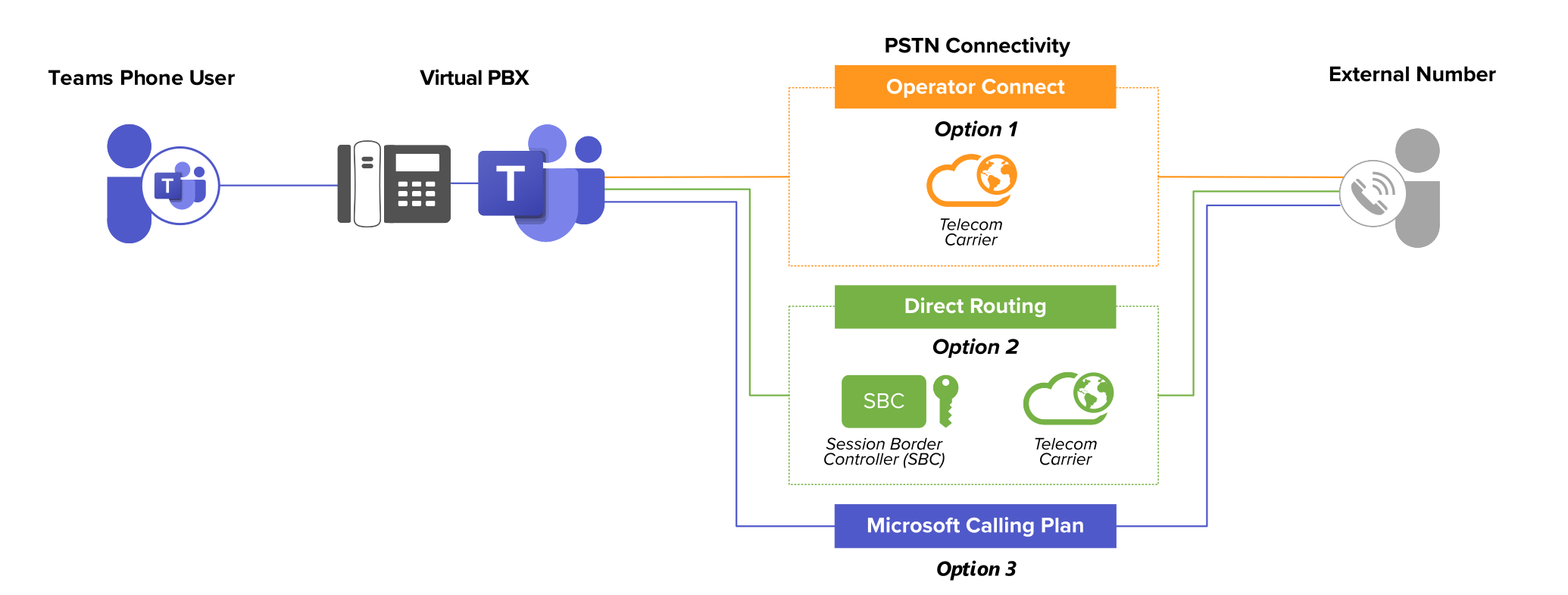
Enterprise telephony typically operates by routing outbound telephone calls from a PBX to the Public Switched Telephony Network (PSTN) and then onward to the intended recipient. Similarly, Microsoft Teams Phone is a cloud-hosted virtual PBX provided by Microsoft that facilitates connecting calls to the PSTN. It enables users of Microsoft Teams to make and receive phone calls external to their organisation. A ‘Microsoft Teams Phone Standard’ license is required from Microsoft for this service, this comes included with E5 by default, but can be purchased separately as an add-on for other eligible licences. When deploying Teams Phone, organisations must determine the optimal way to connect Teams to the PSTN. There are three options currently available:
Operator Connect: A service provider integrates their infrastructure directly with Microsoft Teams via Microsoft Azure to provide the most reliable service, this process requires strict certification by Microsoft to ensure the expected quality and service levels are achieved by the service provider in each country they have listed.
Operator Connect capitalises on the simplicity of Microsoft Calling Plans combined with the flexibility of a third-party provider that can offer broader global coverage, or additional bespoke services such as specialised managed services and support.
Direct Routing: An organisation has the option to deploy Direct Routing in-house, assuming they possess an appropriate carrier and the required skills and expertise to deploy and configure infrastructure. Alternatively, service providers can manage or host a dedicated Direct Routing deployment on their behalf. In many cases, the most suitable approach is Direct Routing as a Service (DRaaS), which leverages the service provider’s cloud-hosted multi-tenant platform and their status as a carrier to route calls to the PSTN, offering a comprehensive end-to-end service. However, in many ways Operator Connect is a newer and improved method to achieve the same results as DRaaS.
Microsoft Calling Plans: Microsoft serves as the sole carrier, routing calls to the PSTN via its infrastructure to downstream carriers behind the scenes. Users have a pre-packaged bundle of minutes for a set monthly fee purchased directly from Microsoft.
The core functionality of Teams Phone remains consistent across these three call delivery methods, ensuring a consistent user experience. However, there are significant differences between these options when considering key factors such as cost, coverage, flexibility, integrations, service levels, and support.
Microsoft Calling Plans – a simple approach for smaller organisations.
Microsoft Calling Plans offer a ready-to-use solution that is simplest to sign up to, albeit potentially more expensive, less flexible, and limited in terms of country coverage and support. They are generally more fitting for smaller organisations with fewer than 100 users.
Deployment: Calling Plans, provided by Microsoft, serve as the link between Teams Phone and the PSTN over its own infrastructure. Each user is assigned a phone number for inbound calls (or their existing number is ported to Microsoft) and a pre-set bundle of minutes for outbound calls. The choice is between ‘Domestic Calling Plans’ (where international calls incur additional charges) or ‘Domestic and International Calling Plans’.
Fixed cost: Calling Plans come with a monthly fee per user per month. The standard Domestic Calling Plan for users in the US currently costs $12 per user per month for 3,000 domestic minutes, and the Domestic and International Calling Plan costs $24 for an additional 600 international minutes. Prices are comparable in other countries although the number of minutes in the bundle is reduced. In practice, few users will fully use their allocation of minutes. Although minutes can be pooled among users on the same Calling Plan within the same country, this can lead to paying for more minutes than required.
Coverage: Calling Plans are only available for certain countries in Europe and North America, as well as Australia and Japan (33 countries in total at the time of writing). Organisations with users in other locations will need to deploy Operator Connect or a Direct Routing solution for those users if they wish to use telephony in Teams.
Service and Support: Microsoft does not provide configuration support, migration services, nor deployment of Calling Plans – meaning organisations will have to manage all related tasks independently or seek assistance from a 3rd party.
Operator Connect and Direct Routing – enterprise-grade solutions
Operator Connect and Direct Routing serve as more advanced solutions, although Direct Routing is generally suited for larger organisations with more than 100 users, Operator Connect is effective for organisations of any size. They both offer increased flexibility, wider geographical coverage, and superior value compared to Calling Plans. Depending on the Direct Routing scenario, both Direct Routing and Operator Connect have the ability to integrate with on-premises equipment such as PBXs, SBCs, or other legacy analogue devices through the operator’s SIP Trunking or other integrations solutions. Direct Routing is more complex to deploy than Operator Connect, which is why organisations are increasingly opting to use a managed service provider that can provide Operator Connect, Direct Routing, as well as SIP Trunking services to ensure the full range of options are available in all scenarios.
Deployment: Operator Connect and Direct Routing integrate with Microsoft Teams Phone, routing calls through managed service providers and/or the carriers networks directly to the PSTN. Both solutions can be self-managed, although managed services solutions are attractive to many because the provider manages the whole onboarding and ongoing management, freeing up the time of admins for other important projects.
With Teams Phone served by Operator Connect, DRaaS, or Calling Plans there is no need for any physical equipment on the business premises, thereby saving on hosting costs and the need for specialist internal expertise.
Direct Routing does require the use of an SBC, which can be either physical or virtual, depending on your needs. Alternatively, A DRaaS provider can utilise their multi-tenant carrier-grade SBC.
Depending on the provider, Operator Connect and Direct Routing are both able to be integrated with on-premises devices or 3rd party solutions.
Operator Connect and Direct Routing can be combined within your Office 365 tenant to provide a hybrid approach to optimise flexibility where needed, while maintaining simplicity elsewhere.
Flexibility on cost: You are free to choose your own provider who can design a bespoke package that meets your organisation’s unique requirements. Operator Connect and Direct Routing providers typically offer a lower price point per user compared to Microsoft Calling Plans, and there is room to negotiate on pricing, as well as selecting different bundles and calling packages for different user-types.
This aspect is particularly crucial for larger organisations that can leverage economies of scale or those with complex needs, such as an international footprint, or specialist integration requirements like contact centres or policy-based recording for legal or financial compliance purposes.
Coverage: Operator Connect and Direct Routing providers can offer Teams telephony calling in almost all countries. Where local regulations restrict the use of cloud telephony, some managed service providers can deploy in-country SBCs to ensure Teams telephony can be used in a compliant way. Specific Teams features such as Location Based Routing for such regulatory purposes are only available with Direct Routing. However, that doesn’t mean using Operator Connect would not be compliant, always discuss such matters with your provider and they will be able to find a solution.
Service and Support: Managed service providers can plan and implement a solution and provide ongoing support. For Direct Routing, that also includes configuring the dedicated or shared SBCs that act as gateways between Microsoft Teams Phone and the PSTN, as well as setting up voice routes and policies in your tenant. For Operator Connect, once you have given consent, the process to provide numbers into a tenant is automated through Microsoft’s Operator Connect API and available immediately to assign to users. Managed service providers can also help you to optimise your corporate network for Teams telephony, highlight any potential issues that could impair call quality, and manage porting for existing direct dial phone numbers if required.
Summary
By incorporating enterprise telephony into Teams with Microsoft Teams Phone, organisations can break free from outdated, legacy, on-premises phone systems – transitioning to seamlessly connected cloud based communications tools.
It sounds easy – and so it should be, by giving you the right knowledge on what your options are in terms of call delivery and pricing, it will allow you to select the most suitable solution for your organisation.
While Calling Plans may suffice for smaller businesses with limited geographical presence, larger organisations are likely to find greater flexibility, scope, and cost-effectiveness in Operator Connect, or even Direct Routing. If you require integrations with on-premises devices, then using a managed service provider to deliver a comprehensive solution means you can have a bespoke system tailored to your requirements, in which design, deployment, integration, telephony services, and support are all part of the package.
According to one predicting, in less than five years, over 90% of Teams telephony users will be using either Operator Connect or Direct Routing for PSTN connectivity. These present an ideal combination of convenience, cost, coverage, and control for organisations. For those that need to integrate with on-premises solutions such as 3rd party contact centres, DECT systems, or analogue phones, simply talk to your provider to make sure they can accommodate your needs in conjunction with Operator Connect (and/or Direct Routing as a Service if an alternative is needed).
To explore how LoopUp can streamline the implementation of Microsoft Teams telephony for your organisation, please reach out to our sales team.